Ajustez l'audio et la vidéo de MediaMonkey 5. Pour en savoir plus, notamment sur les plugins compatibles Winamp, consultez la catégorie MediaMonkey 4/5
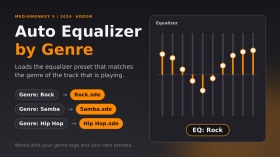
Charge automatiquement un préréglage d'égaliseur en fonction du genre du morceau. Ce préréglage doit être un fichier portant exactement le même nom que le genre et situé dans le dossier Equalizer (par exemple, « Rock » → EqualizerRock.sde). Pour les genres sans préréglage, conservez vos réglages d'égaliseur actuels. Plusieurs genres (« Rock ; Pop ») sont pris en charge : le premier genre disposant d'un fichier de préréglage est utilisé. Un court message « EQ : Rock » s'affiche lors du changement de préréglage.
Testé sur MediaMonkey 2024.2.2.3222 (Windows). Inspiré du script AutoEQ.vbs de DiddeLeeDoo (2006), ce module complémentaire est un code original entièrement réécrit pour MediaMonkey 5.
En português : régler automatiquement le préréglage de l'égaliseur conforme au général de la loi. L'archive du préréglage doit être utilisée comme nom général, à l'intérieur de l'égaliseur.
Translated automatically (see original)Automatically loads an equalizer preset when the track changes, based on the track’s genre. The preset must be a file named exactly like the genre inside the Equalizer folder (e.g. genre “Rock” → EqualizerRock.sde). Genres without a preset keep your current equalizer settings. Multiple genres (“Rock; Pop”) are supported: the first one with a preset file is used. A short “EQ: Rock” message shows when the preset changes.
Tested on MediaMonkey 2024.2.2.3222 (Windows). Inspired by the 2006 script AutoEQ.vbs by DiddeLeeDoo; this addon is original code written from scratch for MediaMonkey 5.
Em português: carrega automaticamente o preset do equalizador conforme o gênero da faixa. O arquivo do preset deve ter o mesmo nome do gênero, dentro da pasta Equalizer.
Hide original
By
Fernando Santos & Claude
Soumis par FernandoSantos
Mise à jour 14/10/2026
Historique des versions / Détails
- Version :
- 1.1
- Mise à jour:
- 14/10/2026
- Size:
- 2.99 KB
- Licence :
- MIT (permite usar e modificar, mantendo os crédito
- Fonctionne avec :
- Media Monkey 2024.2
- Changements :
Version 1.1.0 - first public release.
- Automatically loads the equalizer preset that matches the track's genre (Equalizer<Genre>.sde).
- Finds the Equalizer folder on its own (no fixed paths).
- Genres without a preset keep your current EQ (the file is checked first, because loading a missing preset resets the EQ to flat).
- Multiple genres (Rock; Pop) supported: the first one with a preset is used.
- Short "EQ: <preset>" message that disappears on its own.
Tested only on MediaMonkey 2024.2.2.3222 (Windows).Versão 1.1.0 - primeira versão pública.
- Carrega automaticamente o preset do equalizador correspondente ao gênero da faixa (Equalizer<Gênero>.sde).
- Encontra a pasta Equalizer sozinho (sem caminhos fixos).
- Gêneros sem preset mantêm o seu EQ atual (o arquivo é verificado antes, pois carregar um preset inexistente zera o EQ).
- Vários gêneros (Rock; Pop): usa o primeiro que tiver preset.
- Aviso rápido "EQ: <preset>" que some sozinho.
Testado apenas no MediaMonkey 2024.2.2.3222 (Windows).
This is a legacy addon, created before MediaMonkey 5 included CD burning functionality.
The addon is no longer needed for its original purpose, but is still available as it allows you to send tracks from MediaMonkey 5 to MediaMonkey 4 to perform other operations on the tracks aside from CD Burning (e.g. if you wish to burn a data CD, OR perform an operation on the tracks with an addon that is only available for MediaMonkey 4).
- Select the desired tracks.
- Right click, Send to -> CD/DVD (Burn using MM4)...
- MM4 will then open with the tracks added to the Now Playing list.
- Select the tracks in Now Playing. Send to -> CD/DVD/BD (Burn)... to open the CD burning wizard.
This is a legacy addon, created before MediaMonkey 5 included CD burning functionality.
The addon is no longer needed for its original purpose, but is still available as it allows you to send tracks from MediaMonkey 5 to MediaMonkey 4 to perform other operations on the tracks aside from CD Burning (e.g. if you wish to burn a data CD, OR perform an operation on the tracks with an addon that is only available for MediaMonkey 4).
Hide original
- Select the desired tracks.
- Right click, Send to -> CD/DVD (Burn using MM4)...
- MM4 will then open with the tracks added to the Now Playing list.
- Select the tracks in Now Playing. Send to -> CD/DVD/BD (Burn)... to open the CD burning wizard.
By
Ventis Media, Inc.
Soumis par drakinite
Mise à jour 13/04/2022
Historique des versions / Détails
- Version :
- 1.0.2
- Mise à jour:
- 13/04/2022
- Size:
- 2.3 KB
- Fonctionne avec :
- Media Monkey 5.0.2 - 5.0.3

Compatible with MediaMonkey v5 and 2024!
MediaMonkey for Windows can play, cast, or encode most audio/video formats using codecs already installed on your system. If you don't have certain codecs installed, this plugin adds support for:
- Playback of aac (.m4a, .m4b), h.264 (.mp4, .m4v, .mkv), mpeg4 (.avi), + flash, .mov, and mpeg
- Encoding/conversion to aac (.m4a), alac, h.264 (.mp4, .mkv), and mpeg4 (.mp4, .mkv)
- Video subtitles (.srt files)
Codecs in the trial version are limited to 30-days of operation.
Translated automatically (see original)Compatible with MediaMonkey v5 and 2024!
MediaMonkey for Windows can play, cast, or encode most audio/video formats using codecs already installed on your system. If you don't have certain codecs installed, this plugin adds support for:
- Playback of aac (.m4a, .m4b), h.264 (.mp4, .m4v, .mkv), mpeg4 (.avi), + flash, .mov, and mpeg
- Encoding/conversion to aac (.m4a), alac, h.264 (.mp4, .mkv), and mpeg4 (.mp4, .mkv)
- Video subtitles (.srt files)
Codecs in the trial version are limited to 30-days of operation.
Hide original
By
Ventis Media, Inc.
Soumis par jiri
Mise à jour 23/12/2025
Historique des versions / Détails
- Version :
- 3.0.12
- Mise à jour:
- 23/12/2025
- Licence :
- Trial
- Fonctionne avec :
- Media Monkey 5 - 2024.9
- Changements :
This is a minor update that:
- improves m4a efficiency & support
- updates a couple of strings for clarity
- Version :
- 3.0.10
- Mise à jour:
- 05/02/2025
- Licence :
- Trial
- Fonctionne avec :
- Media Monkey 5.0 - 2024.9
- Changements :
This update is required if you installed codec pack 3.0.9 which was missing the aac encoding functionality.
If you're currently on version 3.0.8, the update can be considered optional--it contains updates to the LAV filter component.
- Version :
- 3.0.8
- Mise à jour:
- 05/12/2024
- Licence :
- Trial
- Fonctionne avec :
- Media Monkey 5.0 - 2024.9
- Changements :
This is a minor update and isn't required unless you experience a crash with the MediaMonkey codec 3.0.7
- Fixed crash that can occur if m4a encoding settings are corrupted
- Renamed the addon so that it's clear that it works with MMW 5 and 2024
- Version :
- 3.0.7
- Mise à jour:
- 05/12/2024
- Licence :
- Trial
- Fonctionne avec :
- Media Monkey 5.0 - 2024.9
- Changements :
This is a minor update and isn't required unless you experience a crash with the MediaMonkey codec 3.0.7
- Fixed crash that can occur if m4a encoding settings are corrupted
- Renamed the addon so that it's clear that it works with MMW 5 and 2024
- Version :
- 3.0.7
- Mise à jour:
- 28/08/2022
- Licence :
- Trial
- Fonctionne avec :
- Media Monkey 5.0 - 5.9
- Changements :
- ALAC conversion fix
- Updated icon
- Version :
- 3.0.6
- Mise à jour:
- 09/12/2021
- Licence :
- Trial
- Fonctionne avec :
- Media Monkey 5.0 - 5.9
- Changements :
- Updated lav filter
- Fixed crash with malformed m4a files
- Version :
- 3.0.5
- Mise à jour:
- 26/02/2021
- Licence :
- Trial
- Fonctionne avec :
- Media Monkey 5.0 - 5.9
- Changements :
- WEBM/VP9 conversion fix
- Version :
- 3.0.4
- Mise à jour:
- 26/02/2021
- Licence :
- Trial
- Fonctionne avec :
- Media Monkey 5.0 - 5.9
- Changements :
- Volume leveling fix re. xing header
- Version :
- 3.0.3
- Mise à jour:
- 26/05/2020
- Licence :
- Trial
- Fonctionne avec :
- Media Monkey 5.0 - 5.9
- Changements :
- Fixes playback issue with certain alac files
- Version :
- 3.0.2
- Mise à jour:
- 05/12/2019
- Licence :
- Trial
- Fonctionne avec :
- Media Monkey 5.0 - 5.9
- Changements :
- Fixes crash that occurs with some alac files
Insère une pause configurable de x secondes entre les pistes.
Remarques :
- La durée du silence est configurable via la liste des modules complémentaires.
- Il peut être activé/désactivé via le menu Lecture
Inserts a configurable pause of x seconds between tracks.
Notes:
Hide original
- Silence duration is configurable via the addons list
- It can be toggled on/off via the Play menu
By
Jiri & Rusty
Soumis par jiri
Mise à jour 10/08/2026
Historique des versions / Détails
- Version :
- 1.0
- Mise à jour:
- 10/08/2026
- Size:
- 7.65 KB
- Licence :
- Ventis Reciprocal License
- Fonctionne avec :
- Media Monkey 5.0 - 2024.9
- Changements :
Initial version. Created based on user's request.